Examples
Notes
View on GitHubA searchable list of notes, pinned ones first, with a sync status that reads synced, a count of what is still pending, or offline. Writes go through a queue in SQLite, flushed in order against a small in-process fake server with latency and the odd failure, so the offline pattern is something the app actually has to handle rather than something to imagine.
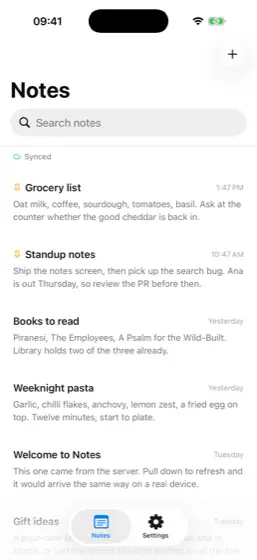
Notes, iOS, light 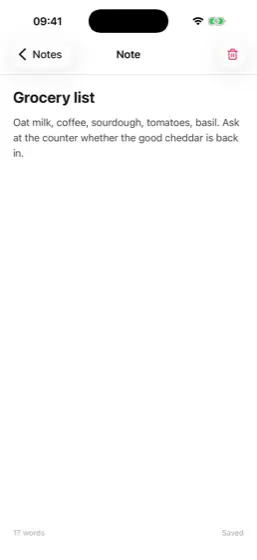
Note, iOS, light 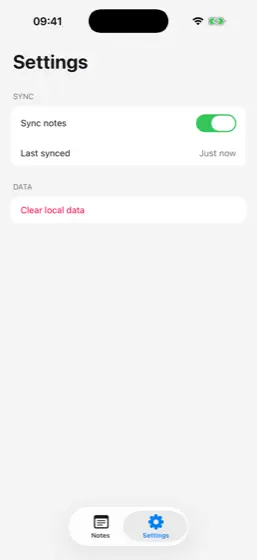
Settings, iOS, light 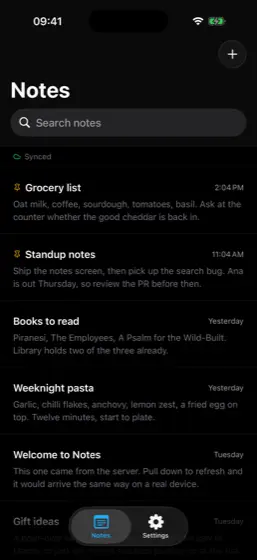
Notes, iOS, dark 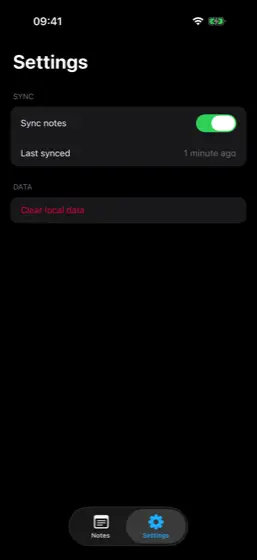
Settings, iOS, dark
What it shows
- Offline syncA write queue ordered by seq, a serialised flush, and a merge that keeps pending notes.
- DatabaseNotes and the write queue persist through SQLite, opened on first use.
- NetworkThe sync status pill reads connected, not reachable, straight from the guide.
- Native tabsNotes and Settings, each a UITabBarController tab with a stack of its own.
- Native headerThe list's large title, with a search bar in the navigation bar.
- Keyboard avoidingThe editor keeps the text fields clear of the keyboard while typing.
- StorageThe last-synced time and the sync toggle persist between launches.
- DialogsDeleting a note and clearing local data both ask first, with the platform's own confirm.
- Icons@ng-icons/lucide, drawn as native shapes for the pin, the sync status and more.
- Testsapp.test.ts creates a note offline and watches it sync once back online.
Run it
Clone the repository and start the app with Expo. Press i for the iOS simulator, a for the Android emulator, or scan the code with Expo Go.
git clone https://github.com/ng-native/ng-native.gitcd angular-native && pnpm installcd examples/notes && pnpm startThe code
Every file in the app, as it is in the repository.
src/app/notes/notes-list.tsOn GitHub
import { Component, computed, inject, signal } from '@angular/core';
import { provideIcons } from '@ng-icons/core';
import { lucideCloud, lucideCloudOff, lucidePlus, lucideRefreshCw } from '@ng-icons/lucide';
import { NgIcon } from '@ng-native/icons';
import { ColorScheme } from '@ng-native/device';
import { Haptics } from '@ng-native/expo/haptics';
import { Pressable, RefreshControl, ScrollView, Text, View } from '@ng-native/components';
import {
  NativeHeader,
  NativeHeaderItem,
  NativeNavigation,
  NativeSearchBar,
  NativeStackOutlet,
} from '@ng-native/router';
import { matchesQuery } from '../data/note.ts';
import { Notes, type SyncStatus } from '../sync/notes.ts';
import { NoteRow } from './note-row.ts';

/** The Notes tab is a stack of its own, for the native header's large title and search bar. */
@Component({
  selector: 'app-notes-stack',
  imports: [NativeStackOutlet],
  template: `<native-stack-outlet />`,
})
export class NotesStack {}

const STATUS_ICON: Record<SyncStatus, string> = {
  synced: 'lucideCloud',
  pending: 'lucideRefreshCw',
  offline: 'lucideCloudOff',
};

const STATUS_COLOUR: Record<SyncStatus, string> = {
  synced: '#22c55e',
  pending: '#f59e0b',
  offline: '#a1a1aa',
};

/** Every note, pinned first, searchable from the navigation bar. Pull down to sync now. */
@Component({
  selector: 'app-notes-list',
  imports: [
    NativeHeader,
    NativeHeaderItem,
    NativeSearchBar,
    NgIcon,
    NoteRow,
    Pressable,
    RefreshControl,
    ScrollView,
    Text,
    View,
  ],
  providers: [provideIcons({ lucideCloud, lucideCloudOff, lucidePlus, lucideRefreshCw })],
  template: `
    <native-header title="Notes" [largeTitle]="true">
      <native-header-item type="searchBar">
        <native-search-bar testID="search" placeholder="Search notes" [(query)]="query" />
      </native-header-item>
      <native-header-item type="right">
        <pressable
          class="size-8 items-center justify-center"
          accessibilityRole="button"
          accessibilityLabel="New note"
          (press)="newNote()"
        >
          <ng-icon name="lucidePlus" size="22" [color]="iconColour()" />
        </pressable>
      </native-header-item>
    </native-header>

    <scroll-view
      class="flex-1 bg-white dark:bg-black"
      contentInsetAdjustmentBehavior="automatic"
      testID="notes-list"
    >
      <refresh-control [(refreshing)]="refreshing" (refresh)="reload()" />

      <view
        class="flex-row items-center gap-1.5 border-b-hairline border-zinc-200 px-5 py-2 dark:border-zinc-800"
      >
        <ng-icon [name]="statusIcon()" size="12" [color]="statusColour()" />
        <text class="text-xs text-zinc-500">{{ statusLabel() }}</text>
      </view>

      @if (shown().length === 0) {
        <view class="items-center px-8 py-16">
          <text class="text-base font-semibold text-zinc-900 dark:text-white">
            {{ query() ? 'No matching notes' : 'No notes yet' }}
          </text>
          <text class="mt-1 text-center text-sm text-zinc-500">
            {{ query() ? 'Try a different search.' : 'Tap + to write the first one.' }}
          </text>
        </view>
      } @else {
        @for (note of shown(); track note.id) {
          <app-note-row [note]="note" (open)="openNote(note.id)" (pin)="togglePin(note.id)" />
        }
      }
    </scroll-view>
  `,
})
export class NotesList {
  private readonly notes = inject(Notes);
  private readonly navigation = inject(NativeNavigation);
  private readonly haptics = inject(Haptics);
  private readonly colorScheme = inject(ColorScheme);

  protected readonly query = signal('');
  protected readonly refreshing = this.notes.isRefreshing;

  /** The header button's icon: near-black on the light header, near-white on the dark one. */
  protected readonly iconColour = computed(() =>
    this.colorScheme.current() === 'dark' ? '#fafafa' : '#18181b',
  );

  protected readonly shown = computed(() =>
    this.notes.notes().filter((note) => matchesQuery(note, this.query())),
  );

  protected readonly statusIcon = computed(() => STATUS_ICON[this.notes.status()]);
  protected readonly statusColour = computed(() => STATUS_COLOUR[this.notes.status()]);
  protected readonly statusLabel = computed(() => {
    const status = this.notes.status();
    if (status === 'offline') return 'Offline';
    if (status === 'pending') {
      const count = this.notes.pendingCount();
      return `${count} pending`;
    }
    return 'Synced';
  });

  protected reload(): void {
    void this.notes.refresh();
  }

  protected openNote(id: string): void {
    void this.navigation.push(['/note', id]);
  }

  protected newNote(): void {
    void this.navigation.push(['/note/new']);
  }

  protected togglePin(id: string): void {
    void this.notes.togglePin(id);
    this.haptics.select();
  }
}